See your target
Profile, partition, region, execution mode, and endpoint stay in the toolbar so you can check where a request will go.
gui4aws brings selected AWS resources into a focused Tkinter workspace. Browse details, inspect output, and review generated scripts before taking action.
Choose a profile, region, execution mode, and endpoint in the toolbar. Browse registered services, filter results, and inspect details and output in one window.
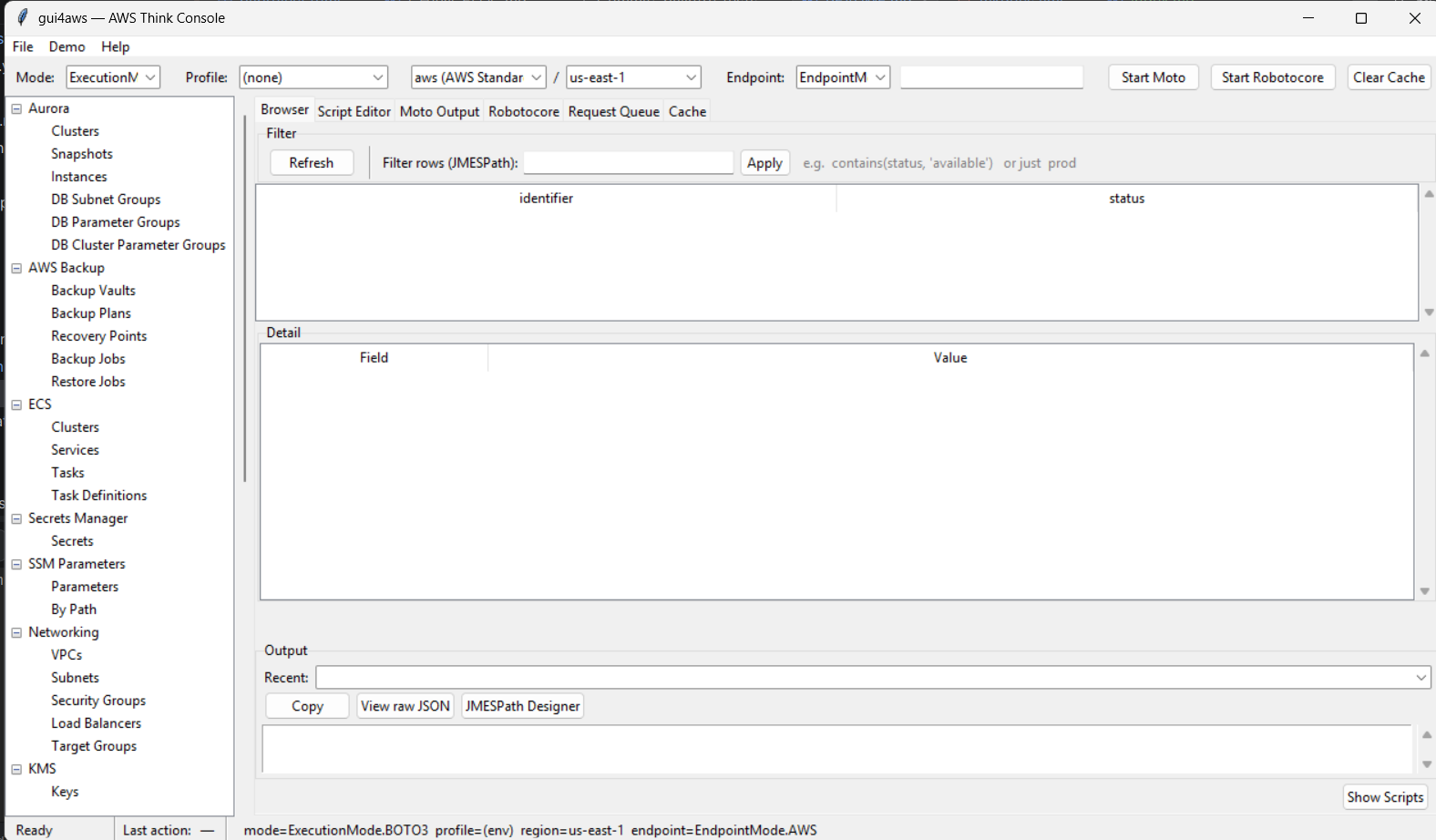
gui4aws keeps the target and operation visible. It uses boto3 or the AWS CLI behind a desktop interface, with local emulator targets for development.
Profile, partition, region, execution mode, and endpoint stay in the toolbar so you can check where a request will go.
Write and cost affecting actions open a review dialog with generated CLI and Python. Destructive actions also require typed confirmation.
Inspect generated commands, use the script editor, and export actions as ordinary scripts you can read and adapt.
Install the package, then open the application. Your AWS credentials come from the usual profile or environment chain. The app does not create credentials for you.
Installation guide ↗$ pipx install gui4aws
$ gui4awsService panels have different levels of support. gui4aws is a focused desktop tool, and some workflows still need the AWS Console or CLI. Check the documentation ↗ for current usage.